Posts

WCP-BPM12c: Process Workspace
Image
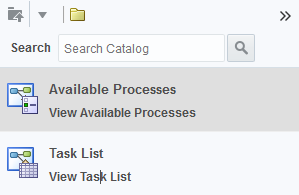
In case of you are planning to integrate the BPM Process Workspace in WebCenter Portal in 12c version then read the following :). First of all you need to follow the steps mentioned in the official documentation ( Note that now this information is in the BPM 12c documentation and not in WCP 12c documentation) : BPM 12c - Integrating with Oracle WebCenter Portal Basically you need to: Register a BPEL connection within WebCenter Portal. Restart Portal (then it will use this BPEL connection to create a Worklist Connection as well). You can check all of this connections by using WebCenter Portal WLST Scripts. Add the BPM Resource Catalog as in the Shared Assets of WebCenter Portal Surprisingly the Resource Catalog only offers the Task List and Available Processes Task Flows. I am wondering what happened with Cases and other stuff you can access in the BPM Workspace :/. In 11g version we had the Portal Templates and a complete setup of BPM Task Flows. All of them has been dep...
WCP 12c: Automatic switch of the Skin when a Template is selected

Image
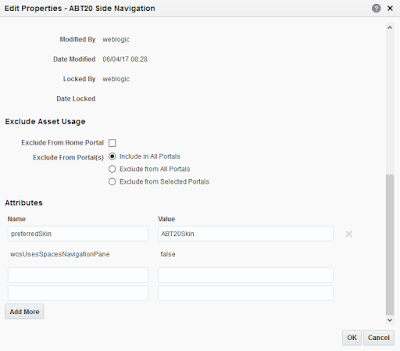
Do you like when an Out of the Box Page Template is selected then a Skin is selected automatically?. You can do it with to your custom Page Template / Skins as well. Basically you need to add a property to your Page Template called preferredSkin. Go to the Edit Propertie s of your Page Template and add the preferredSkin (skin-family name). preferredSkin Property for auto-skin selection Now when you select the Page Template then the Skin will be automatically selected as well. This will help your Portal Administrators to do not have headaches looking for the Skin that is more suitable for your Page Template.

WebCenter Portal 12.2.x.x: Performance Bug in VCR services

During my last project of Oracle WebCenter Portal 12c we have found a performance degradation when using Content Presenter. As you know, Content Presenter calls the following services which are coming from PortalVCRHelper component: VCR_GET_CONTENT_TYPES: Returns the list of Content Types which are Profiles and Region Definitions defined in WebCenter Content. VCR_GET_CONTENT_TYPE: Returns specific information of the Content Type. VCR_GET_DOCUMENT_BY_NAME: Returns the information of a DOC_INFO + the Content of the Data File (XML content). On Oracle WebCenter Content 12cR2, Imaging has been embedded into the Content Server as two components: Imaging : Bringing Imaging capabilities to the new Content Manager Task Flow (which is the WCC ADF UI embedded in WebCenter Portal). IpmRepository : The old capabilities of using Imaging as a repository. Imaging executes some filters in Oracle WebCenter Content which degrades the performance of the VCR calls when the number of Profile...

Speaker at OGh Tech Experience 2017!

Dear friends / fans and lovers of Oracle WebCenter 12c! I will be in the OGh Tech Experience 2017 for speaking about "Performance in Oracle WebCenter 12c" for sharing tricks, tips and experiences I had on WebCenter 12c! Stay tuned!!!! https://www.ogh.nl/

WCP 12.2.x.x: BUG Customizing the Welcome / Login Page

Image
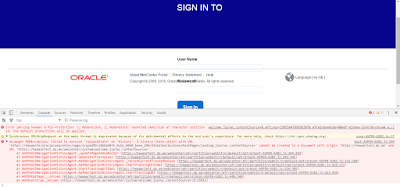
Hello everyone and welcome to 2017!. We comeback again to the Blog and not sharing a BUG I have raised to Oracle. The bugs can be tracked as following: Bug 22748849 : System page customization for Welcome Page not working Bug 22921957: - UNCAUGHT SECURITYERROR: FAILED TO EXECUTE 'REPLACESTATE' ON 'HISTORY' ON PAGELOA Summary of the Bug: "If you customise the Login Page then a JavaScript error will happen in the ADF JS boot.js. This error will block you to try to login again after a first fail attempt which is quite annoying. In addition, restoring the Welcome Page to the default one will not fix the issue". ADF JS Error Basically, the steps to reproduce it are the following: 1. Go to http://wcp.vm.oracle.com/webcenter/system/welcome.jsp 2. Enter wrong password and then sign in 3. It will redirect to http://wcp.vm.oracle.com/webcenter/system/login.jsp?login_fail=true 4. Try now to re-enter the password and I am logged in. 5. Go to A...

WCP 11gR1: Change the Password Programmatically

Recently we implemented a Custom Interface for changing the password in a WebCenter Portal 11.1.1.8 environment. Here I am sharing some of the code to achieve it (taken from WebCenter API). Java Code Snippet: public void setPassword(ActionEvent event) { String METHOD_NAME = "setPassword"; logger.entering(CLASS_NAME, "setPassword"); final String userName = WebCenterSecurityUtils.getUserName(); try { FacesContext fCtx = FacesContext.getCurrentInstance(); Application app = fCtx.getApplication(); // This managed bean returns if the Change Password is allowed in WebCenter boolean allowPasswordChange = ((Boolean)ADFContext.getCurrent().getExpressionEvaluator().evaluate("#{o_w_wa_i_v_b_changePasswordBean.passwordChangeAllowed}")).booleanValue() if (!allowPasswordChange) { logger.fine(CLASS_NAME, "setPassword", "skipping passwd change as admin has disabled it"); WCApplicationContext...

WCP 11gR1: Last Login of Portal Users

Hi. Recently I was asked about how to retrieve the latest login time of a specific user in WebCenter Portal 11.1.1.8 Basically, the solution was consuming WebCenter Analytics schema which holds analytics about user login. SELECT DISTINCT ASDIM_USERS.USERID AS "User", ASFACT_WC_LOGINS_0.OCCURRED as "last_login" FROM ASFACT_WC_LOGINS_0 , ASDIM_USERS WHERE ASFACT_WC_LOGINS_0.USERID = ASDIM_USERS.ID AND ASDIM_USERS.USERID = 'myuser' ORDER BY ASFACT_WC_LOGINS_0.OCCURRED DESC   Obviously, WebCenter Portal has to be configured with WebCenter Analytics Collector for using the above query consuming the ACTIVITIES Schema. Thanks to Paco Roldán for collaborating on it :).