Posts

Showing posts with the label WebLogic 12c

OFMW: 12.2.1.4 Released

Hi, After a long time waiting for it, the Oracle Fusion Middleware 12.2.1.4 has been finally released. Oracle Fusion Middleware 12.2.1.4 Official Documentation In this post, I will focus on my personal view over the Oracle Fusion Middleware products which I most commonly use over the last 8 years which are the SOA Suite (including BPM and OSB), WebCenter Suite (Portal, Content, Sites), Oracle ADF and Oracle WebLogic Application Server mainly. Certification Matrix As every release, I make a round around the Certification Matrix of every Oracle Fusion Middleware Release to check if the Java JDK accepted has been increased or not. Oracle Certification Matrix for Oracle Fusion Middleware 12.2.1.4 Java However, I found that we are still in the J2SE / J2EE 8 and the maximum certified JDK is Oracle JDK 1.8.0_211+ which means any 1.8.0_xxx if you are using Oracle JDK as the JDK vendor. Database The biggest new is the certification with 18.3+ and 19.3+ of the On-Premise vers...

OJET: Build and Deploy in an Application Server

Image
There are some other sources where an Oracle JET Application is packaged and deployed as a WAR in Oracle WebLogic Application Server (Arda Eralp) https://blogs.oracle.com/ardaeralp/deploy-oracle-jet-application-to-weblogic-server (Andrejus Baranovski's) http://andrejusb.blogspot.com/2016/07/serving-oracle-jet-application-from.html They may look bit old or maybe because they call directly grunt tasks by using the grunt-cli . In this post I will update a bit these posts in Oracle JET 6.1.0 and the usage of ojet build (instead of calling the grunt tasks) for also building the corresponding WAR file. The example can be found in my GIT repository: https://github.com/DanielMerchan/ojet-examples Let's start... Install grunt-war module in your Oracle JET Application. npm install grunt-war --save-dev Create a war.js (or call it whatever you want) in /scripts/grunt/config folder under your souce files. This is a sample code inside of it, check https://www.npmjs.com/packag...

WCP12c: Embed a Login Task Flow in a Page or Page Template

Image
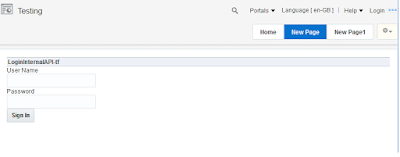
Recently I saw a question in OTN: Oracle WebCenter Portal on how you can embed a Login into a Page or Page Template. You can find the code in my GitHub repository: https://github.com/DanielMerchan/WebCenterExtensions There are many ways to do this, but in this post I will bring only two: Using Internal API: It uses some available Manage Beans in the Portal Scope for supporting authentication. This API is compatible with OAM / WebLogic Authentication. Using Java EE API: It uses the HttpServletRequest login method to perform WebLogic Authentication. Since 12c, the AutheticationServlet.login of the WebLogic API has been deprecated. It can be uses standard JAAS Authentication. The LoginInternalAPI Task Flow implements the first approach and the LoginJavaAPI Task Flow implements the second approach using a custom backing bean. For testing, you can add the Task Flow to the Portal Resource Catalog and add it to a WebCenter Portal Page. If you want to use it in your Page Templa...