Posts

Showing posts with the label WebLogic

WCP 12.2.1: Installation V (Oracle Fusion Middleware Infrastructure 12.2.1)

Image
In 11g versions the Oracle Fusion Middleware Infrastructure were not required to be installed. In addition, the RCU 11g were downloaded and installed. In 12c things changed and now you have to install in your WebLogic 12 Domain the Oracle Fusion Middleware Infrastructure in order to have ADF Framework, MDS Support and also the RCU!!!!! Download the installer from: http://www.oracle.com/technetwork/middleware/weblogic/downloads/wls-main-097127.html Unzip and run the Universal Installer . Select the ORACLE_HOME where the product will be installed Install with or without the examples (as you wish). Now execute the RCU to create the default prefix and base schemas! You can find the RCU in /oracle/product/oracle_common/bin If during your database connection are you facing the following error Error connecting database using orcl It is because we installed in Multitenant way! Use the pdborlc instead of the orcl :) Now let's the wizard create the DEV_STB table r...

WCP 12.2.1: Installation IV (Oracle WebLogic 12.2.1)

Image
Download the installer of WebLogic 12.2.1 from: http://www.oracle.com/technetwork/middleware/weblogic/downloads/wls-main-097127.html Unzip the installer in /oracle/software and execute java -jar -d64 fmw_12.2.1.0.0_wls.jar to initiate the Installation Wizard. Remember to set the /oracle/product as the Home for the products Home as recommended by Oracle in the official installation guides. WebLogic Oracle Home When finishing the installation then you can create the domain after it or just wait until WebCenter Software is installed. In our case we are going to create it because we will install and configure OHS 12c before of the WebCenter products. In this case we will create webcenter_domain in the recommended path of the official installation guide. /config folder webcenter_domain path Just select the following templates by the moment. Templates for the domain (we did not install webcenter software yet)  During the Wizard, just configure a machine call...

JDeveloper 11.1.1.6: Error al ejecutar el servidor integrado

Hace tiempo encontré en el foro de OTN algún post como el siguiente: Post de OTN con problemas al arrancar Integrated WebLogic porque no puede aplicar una template Fragmento del error: wlst > Adding domain extension template: /C:/oracle/Middleware/jdeveloper/common/templates/applications/jrf_template_11.1.1.jar Error: addTemplate() failed. En mi caso, la stack trace contenía el error de que no podía aplicar la template para jrf_template_11.1.1 ¿Cómo solucionar este error?. Hay que asegurarse de que en la %ORACLE_HOME% únicamente aparece una vez esta template. Al buscar en C:/Oracle/Middleware (Middleware por defecto configurado cuando se instala JDeveloper) por la template  jrf_template_11.1.1 observé que estaba 2 veces. Una de ellas en la ruta: C:\Oracle\MiddlewarePS5\oracle_common\common\templates\applications Y otra en: C:\Oracle\MiddlewarePS5\oracle_common\common\templates\was Eliminando la que se encontraba en \was y ejecutando de nuevo el WebLogic I...

WebCenter Portal: Configuración de alta disponibilidad

Las etapas que se siguen en la mayoría de proyectos es la siguiente: Desarrollo en entorno local e integración de los desarrollos en un entorno de desarrollo común. Este entorno normalmente suele ser standalone . Entorno de test o certificación. En algunas ocasiones este entorno es standalone y en otras ocasiones es una simulación real del entorno productivo, por lo que es un entorno en clúster . Entorno productivo. Normalmente suele ser un entorno en clúster. El motivo de esta entrada no es otro que asegurar, desde el principio del desarrollo, que los desarrollos ADF ( Task Flows, WebCenter Portal Application... ) estén preparados para ser ejecutados independientemente del entorno. ¿Qué se debe cambiar de la configuración de las aplicaciones ADF desplegadas en entornos en clúster?.   adf-config.xml . En el fichero de configuración de ADF debe habilitarse la posibilidad de que el framework haga un seguimiento y replique los manage beans en el clúster. Esto se co...

Procesamiento de XML y uso de XSLT en aplicaciones de SiteStudio o WebCenter

Image
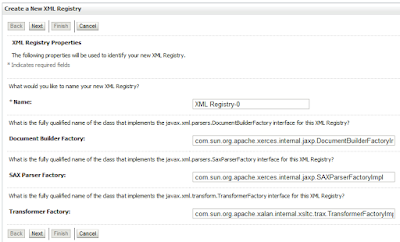
Una de los problemas más comunes a la hora de utilizar XSTL (JSTL para XML), o transformaciones XSL (x:transform por ejemplo) en nuestras aplicaciones de Oracle WebCenter o SiteStudio XA (SSXA) suele residir en el SAX Parser registrado tanto en WebLogic, como en nuestra aplicación. El error más usual es el siguiente: XML-22108: (Error) Invalid Source - URL format is incorrect. XML-22000: (Fatal Error) Error while parsing XSL file (weblogic.xml.jaxp.RegistryXMLReader cannot be cast to oracle.xml.parser.v2.SAXParser). ¿Qué significa este error?.  Que WebLogic por su lado esta utilizando y tiene registrado los "Factory" de la librería xerces.jar y por nuestro lado tenemos en nuestro Classpath de la aplicación la librería de  Oracle XML Parser v2.  ¿Cómo se soluciona este error?. Las posibles soluciones a este error tienen 2 vertientes principalmente: Registrar en WebLogic el Parser Oracle XML Parser v2 e incluirlo en su classpath. (Solución 1). Directamente...